 Bettertori Docs
Parsed Emails
Track and review your Tori.fi email processing history. See which emails were parsed, what items were found, and analyze your notification trends over time.
What Are Parsed Emails?
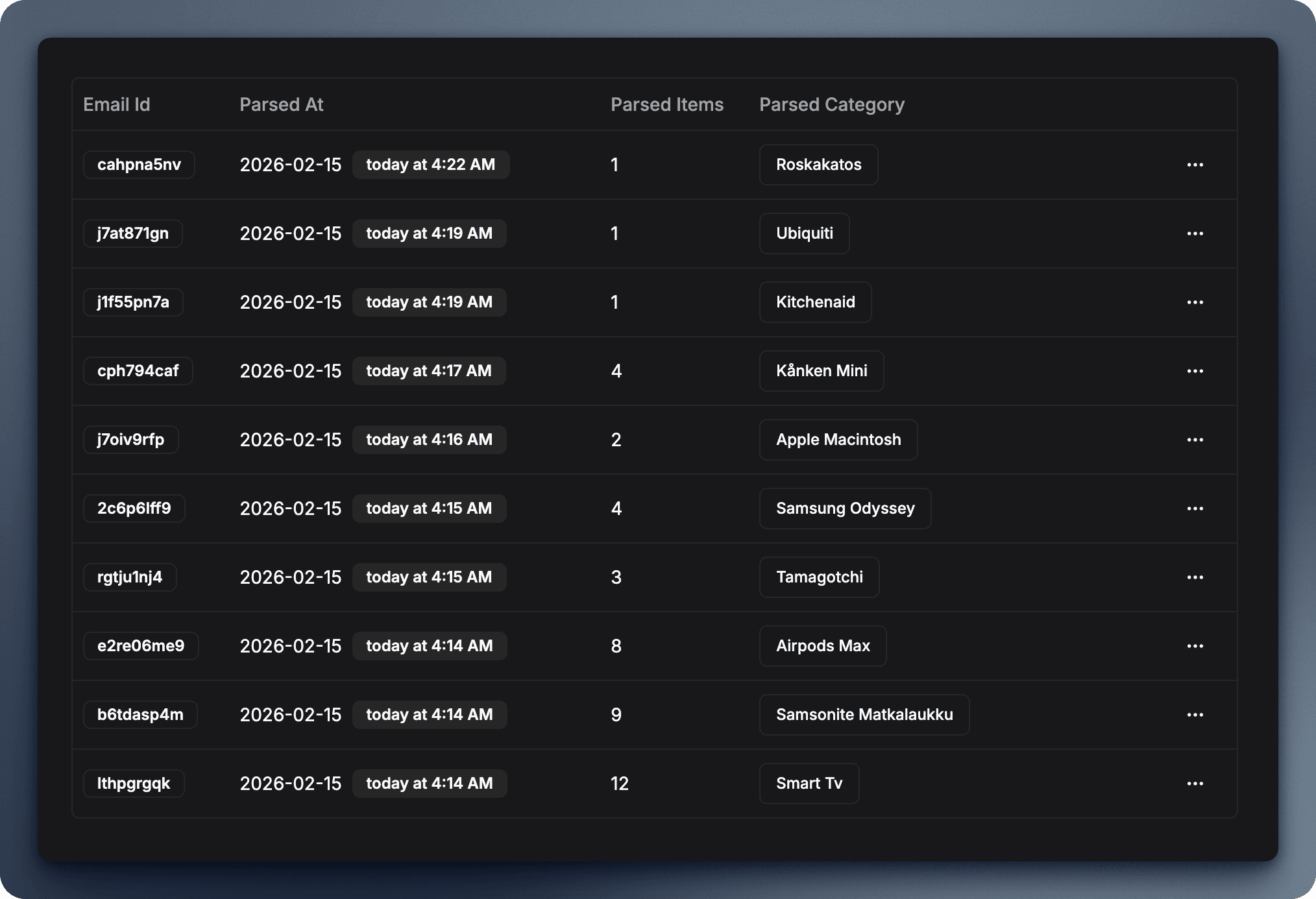
Every time Tori.fi sends you an email notification about new listings, BetterTori parses that email and extracts the items. The Parsed Emails page creates a historical record of this processing, allowing you to:
- See when emails were received
- Review which product categories generated emails
- View all items extracted from each email
- Analyze trends in your notification volume
- Verify that your email forwarding is working
┌─────────────────────────────────────────────────────────────────────────────┐
│                    PARSED EMAIL FLOW                                         │
└─────────────────────────────────────────────────────────────────────────────┘

   Tori.fi              BetterTori Processing              Parsed Emails Page
      │                          │                                  │
      ▼                          ▼                                  ▼
┌──────────┐      ┌──────────────────────┐      ┌──────────────────────────┐
│  Email   │      │   Email Parser       │      │   Historical Record      │
│  Sent    │─────▶│   • Extract items    │─────▶│   • Email received time  │
│          │      │   • Categorize       │      │   • Product category     │
│          │      │   • Store in DB      │      │   • Number of items      │
└──────────┘      └──────────────────────┘      │   • Item details         │
                                                 └──────────────────────────┘
                                                          │
                                                          ▼
                                                 ┌──────────────────────────┐
                                                 │   Analytics & Insights   │
                                                 │   • Daily email volume   │
                                                 │   • Items per email      │
                                                 │   • Trending patterns    │
                                                 └──────────────────────────┘

┌─────────────────────────────────────────────────────────────────────────────┐
│                    EMAIL TO ITEMS BREAKDOWN                                  │
├─────────────────────────────────────────────────────────────────────────────┤
│                                                                              │
│   Email from Tori.fi          Items Extracted                                │
│   ┌────────────────┐          ┌─────────────────────────────────────────┐   │
│   │                │          │                                         │   │
│   │  Subject:      │          │  📱 iPhone 14 Pro - €899               │   │
│   │  "New iPhone   │    →     │     Helsinki • 2 hours ago             │   │
│   │   listings"    │          │                                         │   │
│   │                │          │  📱 iPhone 13 - €650                   │   │
│   │  Received:     │          │     Tampere • 5 hours ago              │   │
│   │  Today 14:30   │          │                                         │   │
│   │                │          │  📱 iPhone 14 - €799                   │   │
│   │  3 items       │          │     Espoo • 1 day ago                  │   │
│   │  found         │          │                                         │   │
│   └────────────────┘          └─────────────────────────────────────────┘   │
│                                                                              │
└─────────────────────────────────────────────────────────────────────────────┘
Parsed Emails List
The main Parsed Emails page (/parsed-emails) provides an overview of your email processing activity.
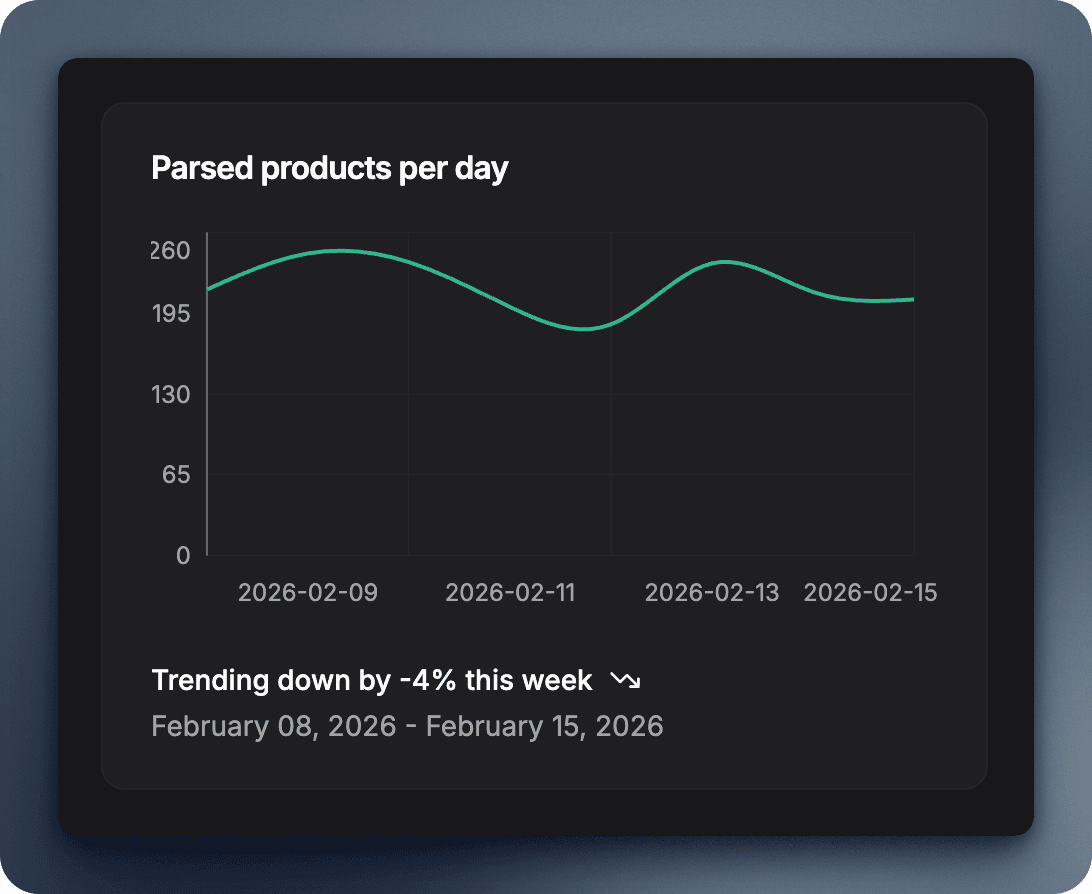
Email Volume Chart
At the top of the page, you'll see a chart showing your email parsing activity over time:
- X-axis: Dates (last 7-30 days)
- Y-axis: Number of emails received
- Data points: Each point represents emails parsed on that day
- Trend indicators: See if email volume is increasing or decreasing
This helps you understand:
- Which days are most active for new listings
- Whether certain product categories generate more emails
- Seasonal trends in the marketplace
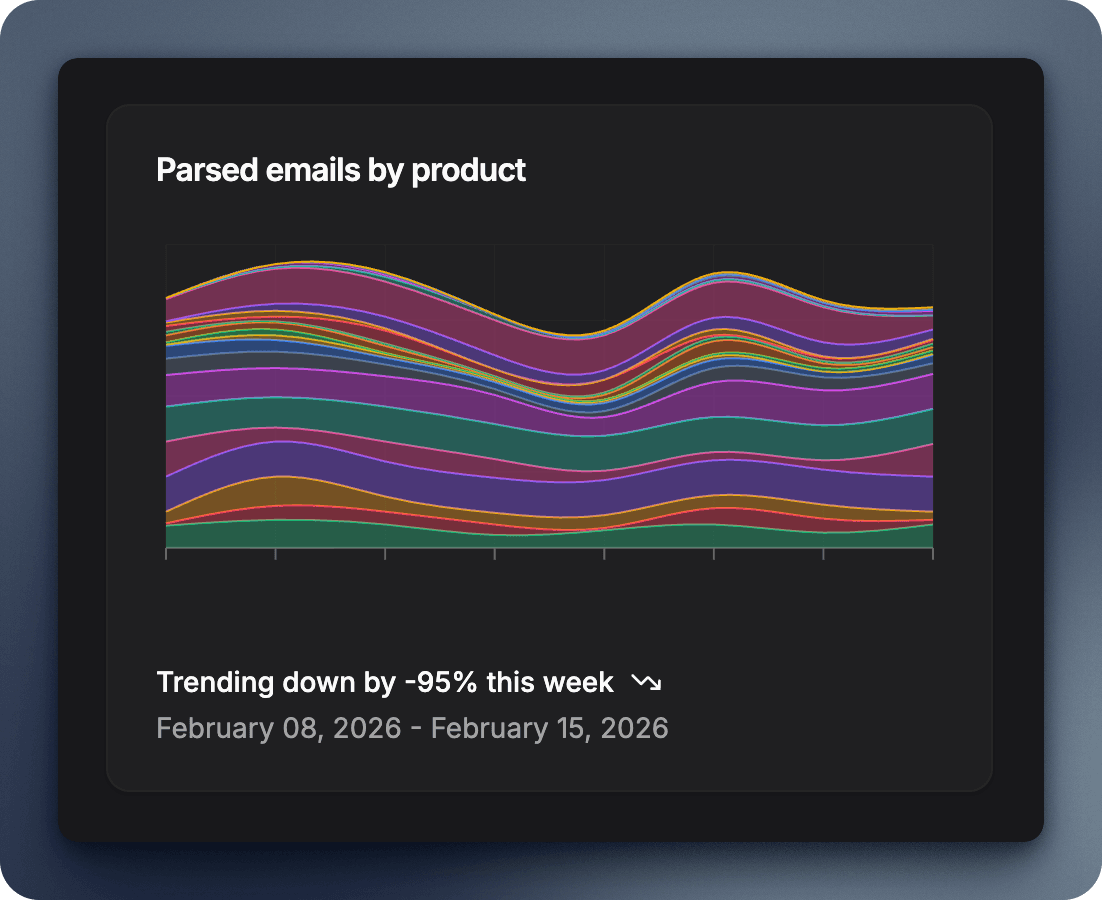
Total Items Chart
A second chart shows the total number of items extracted from all emails:
- Shows the cumulative count of items over time
- Helps identify days with high-value inventory
- Track your total tracked items growth
Emails Table
Below the charts, you'll find a detailed table listing all your parsed emails:
| Column | Description |
|---|---|
| Date | When the email was received and parsed |
| Product Category | Which saved search generated this email |
| Items Count | How many listings were found in the email |
| Actions | View details button to see full item list |
Features of the table:
- Sortable: Click column headers to sort by date, category, or item count
- Searchable: Filter emails by product category
- Clickable rows: Click any email to view its full details
Individual Email Details
Clicking on a specific email opens the detailed view, showing you exactly what was extracted from that Tori.fi notification.
Email Information Card
The top section displays key details about the parsed email:
- Product Category: A clickable link to the product category page
- Items Parsed: The total number of listings found
- Received At: Exact date and time the email was processed
- Relative Time: Friendly display like "2 hours ago" or "Yesterday"
Price Chart
A visual chart shows the price distribution of items from this specific email:
- Y-axis: Price in EUR
- Data points: Each item's price
- Hover details: See the product name when hovering over points
- Quick comparison: Spot the best deals at a glance
This chart helps you:
- Identify the price range for items in this batch
- Find outliers (unusually high or low prices)
- Compare prices across multiple similar items
Items Grid
Below the charts, all items from the email are displayed in a responsive grid:
Each item card shows:
- Product image
- Product name
- Price
- Location
- Date posted
Click any item to view its full details, description, and action buttons.
Why Use Parsed Emails?
Verify Email Forwarding is Working
If you're not seeing new items in your dashboard, check the Parsed Emails page:
- Empty list? Your email forwarding might not be set up correctly
- Old emails only? Forwarding may have stopped working recently
- New emails appearing? Everything is working as expected!
Check this page first if you suspect email forwarding issues. If you see recent emails here but no new items, contact support.
Track Email Processing History
See patterns in your email notifications:
- Peak activity days: Which days have the most listings?
- Category performance: Which searches generate the most emails?
- Volume trends: Are you getting more or fewer notifications over time?
Review Missed Items
If you were away from BetterTori for a while:
- Browse the Parsed Emails list
- Look for emails received while you were away
- Click into emails with high item counts
- Review the items grid to see what you missed
Understanding the Data
What Counts as a "Parsed Email"?
A parsed email is any email from Tori.fi that BetterTori successfully processed:
✅ Counts as parsed:
- New item notification emails
- Daily digest emails
- Search result emails
❌ Doesn't count:
- Password reset emails
- Account notification emails
- Marketing emails from Tori.fi
What Are "Parsed Items"?
Each individual listing found within an email counts as one parsed item:
- Email with 5 iPhone listings = 1 parsed email, 5 parsed items
- Email with 1 bicycle listing = 1 parsed email, 1 parsed item
- Email with 10 gaming items = 1 parsed email, 10 parsed items
Time Zone Considerations
All times shown are in UTC (Coordinated Universal Time). This ensures consistency regardless of where you or the seller are located. The "relative time" display (e.g., "2 hours ago") adjusts based on your browser's local time.
Best Practices
Regular Monitoring
- Check weekly: Review your parsed emails to ensure forwarding works
- After setup: Verify the first few emails appear after configuring forwarding
- After changes: Check after modifying Gmail filters or Tori.fi searches
Analyzing Trends
Use the charts to identify patterns:
- Weekends vs weekdays: Do more items appear on certain days?
- Morning vs evening: When are most items listed?
- Category comparison: Which searches are most productive?
Cleaning Up
Parsed emails are retained for a limited time (typically 30-90 days). After that:
- Older emails are automatically cleaned up
- The items themselves remain in your dashboard
- Only the email processing record is removed
This keeps the system fast and responsive.
If forwarding stopped working, you may need to re-verify your forwarding address in Gmail settings. Read more about setting up the email forwarding here.
Related Features
Parsed Emails works closely with other BetterTori features:
With Product Categories
Each parsed email is linked to a product category. Click the category name in the email details to:
- View the product settings
- See all items from that category
- Enable or disable the category
With Dashboard
Items from parsed emails appear in your dashboard. Use the dashboard to:
- Filter and sort all items
- Search across multiple emails
- View analytics for specific categories
With Notifications
When a new email is parsed, you receive notifications for the items. Check:
- The Notifications page for new item alerts
- The Parsed Emails page to see the source email
- Both together for complete context
With Items
Each item in the items grid links to the full item detail page where you can:
- See complete description
- View all photos
- Access Tori.fi listing directly
- Track the item's status
Privacy & Data
Parsed email data is stored securely and used only to display your processing history. Email content is processed to extract items and then discarded - we don't store the full email text long-term.
What We Parse
- Email metadata (received time, subject)
- Number of items found
- Product category
- Extracted item details
Data Retention
- Parsed emails: 30-90 days
- Items: Indefinitely (until you delete them)
- Analytics: Aggregated data kept for trends
Enable and Disable Products
Learn how to temporarily pause or resume tracking for specific product categories. Control which Tori.fi searches are active without deleting your saved products.
Map
Interactive map features for visualizing Tori.fi listings. View individual item locations or compare multiple product categories across Finland.